EDTECH / SOCIAL
How I gave members of a homeschooling community a place to connect
Context
The Melanin Village is the growth-centered gathering space that provides curriculum and community for Black and Brown homeschoolers.
Problem
Since homeschooling can be isolating and challenging, the community wanted to give its members a way to connect and support each other socially.
What I did
I designed the social feed, chat, group, and event user flows for the client's new cross platform native mobile app.
Impact
My team saved the client $10,319 by designing 124 medium-fidelity wireframes for 13 user stories and updating the design system.

Medium-fidelity mockup of the community's social feed

User flow for looking for events on the app
My role
Year
Duration
UX/UI Design co-lead
Apr. - Jul. 2024
3 months
If you'd like a sneak peek at the prototype...
Check out this recording of the demo I did for the final presentation to the client.

Early challenges
This project began with multiple teams, including an outside consultant (Singular), scheduled to work on the same aspects of the app. In order to move forward, we had to negotiate and decide how best to organize our time and resources.
We came to this arrangement:
-
UX Design team 1 (UXD1)- onboarding, profile, and notifications
-
UX Design team 2 (UXD2, my team)- social feed, chats, groups, and events
-
Singular (the outside consultant)- student information system and curriculum
Also, we struggled early on to organize meetings with Singular. Once, we established regular communication, our collaboration went much smoother!
Collaborating with the project strategy team
The project strategy team created a backlog of the user stories for the app.
My co-lead and I worked with the Strategy co-leads to decide which high-priority user stories to work on first and what needed to be in the minimum-viable product (MVP).
To fulfill the community needs of the app, we chose to prioritize the social feed and direct messaging features followed by groups and events.
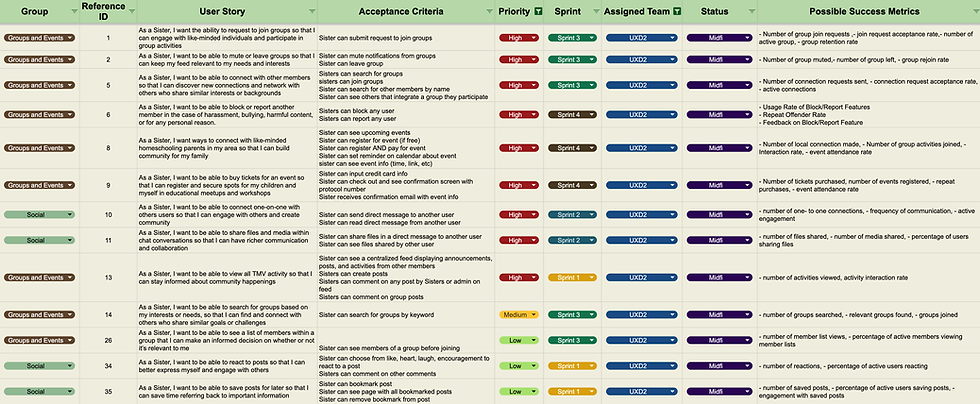
Chart of user story backlog
Creating the sitemap
I collaborated with my co-leads to develop a sitemap.
Deciding on the architecture of the app allowed us to better understand how the pages would connect and interact.

Sitemap for the native mobile app
Looking for pain points in the user's journey
We created user journey maps, like this one for creating a post in the feed, so that we could better understand the steps a user would need to take to accomplish a task.

User journey map of creating a post on a social feed
Determining the app's user flows
I worked with my team to establish the following user flows for the app:
-
Reacting to a post
-
Creating a post
-
Chatting with other members
-
Joining groups
-
Finding an event to attend
-
Buying tickets for events
An example: Creating a post
As a user, I want to be able to write a post to share with the community and friends.

User flow of creating a post on the social feed
Designing the screens
Once the user flows were established, my co-Lead and I asked our team to conduct a competitive analysis of other sites' social feeds and direct messaging looking for inspiration.
We looked at Facebook, Slack, Whatsapp, LinkedIn, Instagram, Discord, Peanut, and NextDoor.
Our team then divided into groups to work on low-fidelity wireframes informed by common design patterns we found during our research.
Creating the home feed
As groups, we designed options for the feed, our main screen, and then voted on elements we wanted to include:
-
Tab navigation at the top
-
Write a post
-
Read other posts
-
React to posts
-
Comment on posts
-
Save posts
-
Bottom navigation to access the rest of the app
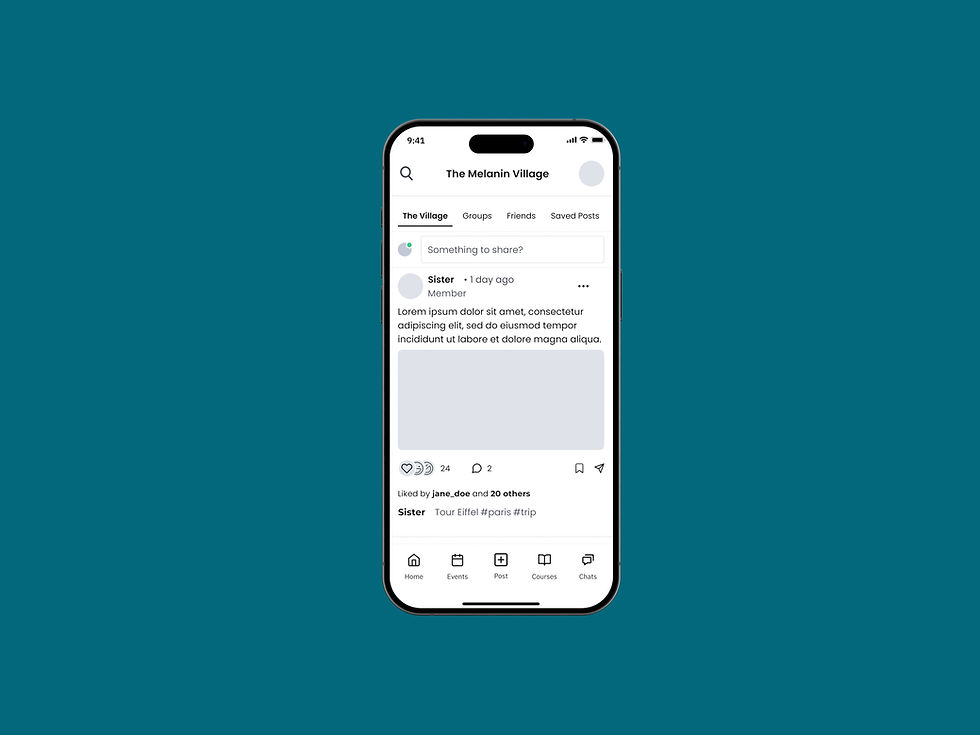
Low-fidelity mockup of the community's social feed
Client feedback and collaboration with the UX writing team
Once we had the low-fidelity wireframes ready, we presented them to the client and the UX Writing team.
Some initial call-outs were:
-
The client decided that there would not be any friend requests. Everyone in the app would be connected, so "Friends" became "Members"
-
UX Writing asked us to revise "Groups" to "Circles" and "Sister Circles" to match The Melanin Village's naming system and tone of voice
Updating the design system
For consistency throughout the app and between the design teams, we revised components and created new ones.


The tab navigation components used in the home feed.
Examples of pop-up modals used in the app.
Components for how users will communicate within the app (text boxes, reactions, etc).
Components to be used wherever lists of content are needed in the app.
Creating the medium-fidelity wireframes & prototype
Our design system was updated, feedback was implemented, we made tweaks and changes, and arrived at the final designs.
Check out the prototype below!
The client called this Tech Fleet's "strongest phase yet!"
Wrap up
I am so proud of what my team accomplished! Through a lot of hard work and determination, we designed 6 user flows and 124 screens for the social feed, direct messaging, groups, and events.
Overall, Tech Fleet's UX Design teams completed 13 user stories, including all of the high-priority stories in the backlog and, we saved the client $10,319!
Cross-functional collaboration and communication is so important! I worked very closely with the leads of the other UX design team, the UX writing, and project strategy teams to make sure that we were all working towards the same goal each sprint.
While I didn't be continue on with this project, I look forward to seeing how The Melanin Village app continues to develop!